See inside Studio
A quick guide to Studio’s tools, features, and controls.
Tap a number to find it in the list, or a line in the list to find it on the screen.
Registering and logging in
Log in
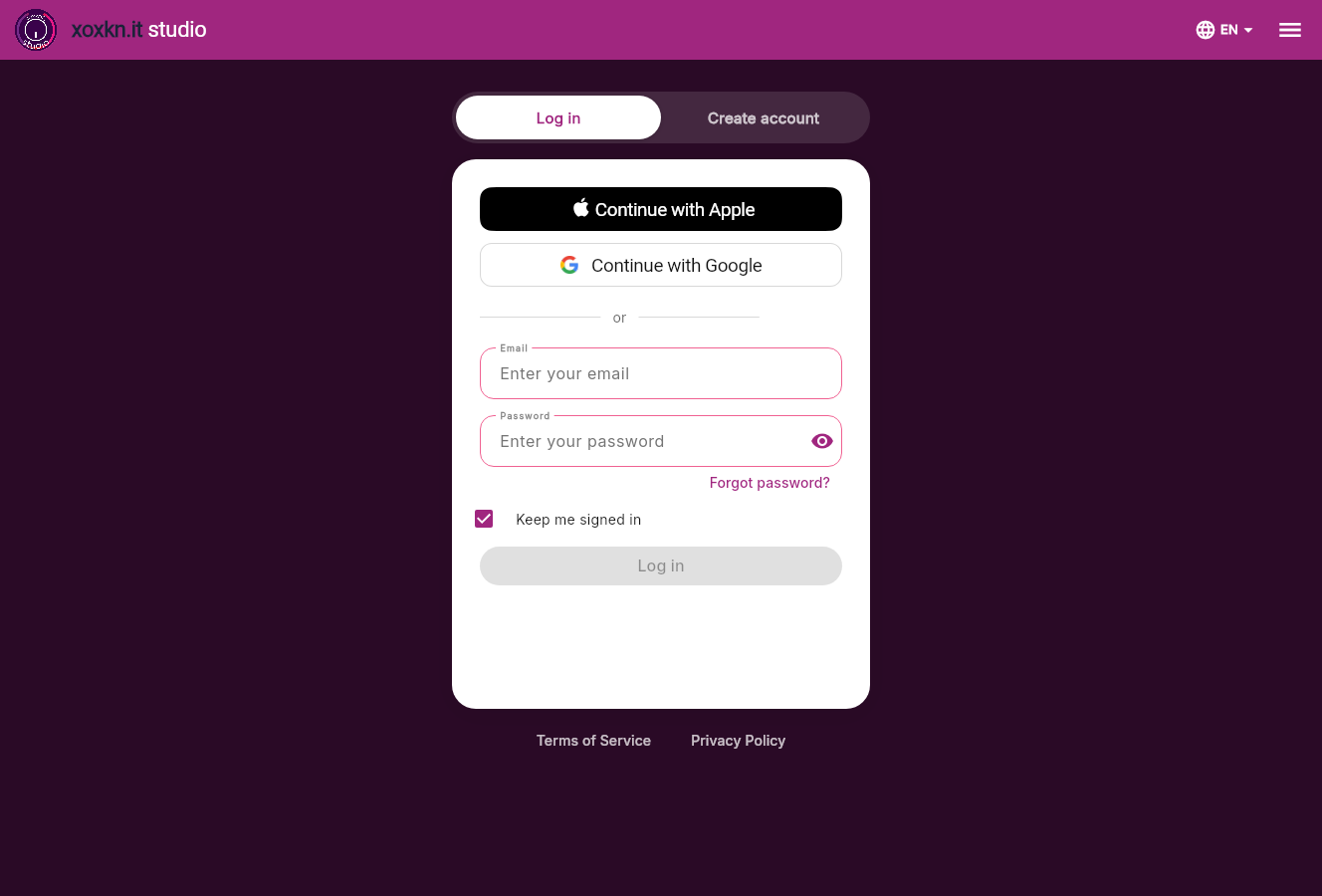
ALog in or create an account
- 1Log inAlready have an account? Stay on Log in, and use the same email, Apple or Google account you registered with.
- 2Create accountNew to Studio? Switch to Create account. If it says the email is already in use, you already have an account: come back to Log in.
BApple or Google
- 3Continue with AppleLog in with your Apple ID, if that is how you registered.
- 4Continue with GoogleLog in with your Google account, if that is how you registered.
CEmail and password
- 5EmailThe address you registered with.
- 6PasswordYour password. Tap the eye to see what you typed.
- 7Forgot password?We email you a link to set a new password. If it does not arrive, check your spam folder.
- 8Keep me signed inStay signed in on this device. Untick it on a shared computer.
- 9Log inLights up once your email and password are filled in.
DLanguage
- 10LanguageChoose the language the app speaks.
Create account
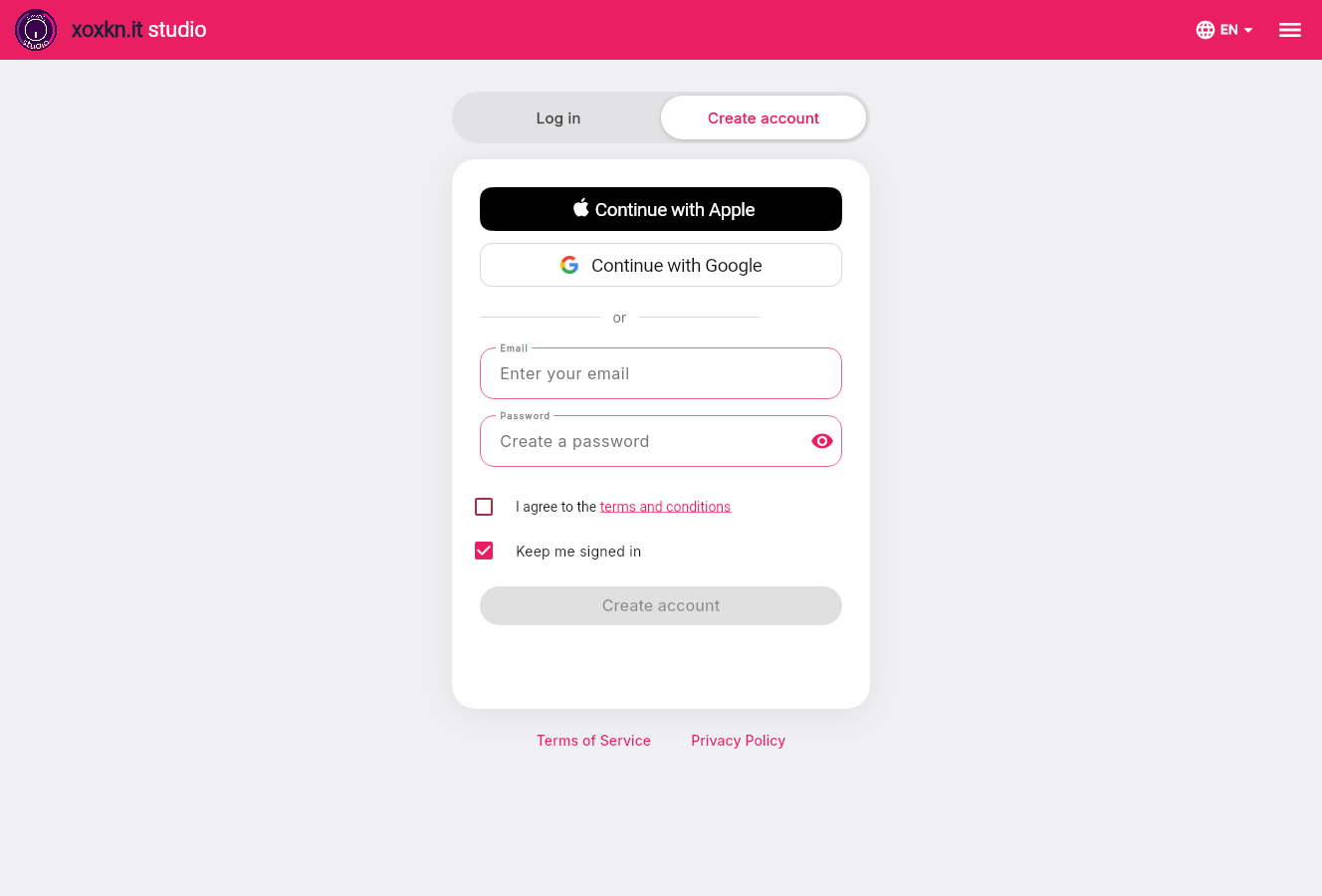
ACreate an account
- 11Create accountPick one way to register: Apple, Google, or an email and password. Next time, log in the same way.
BApple or Google
- 12Continue with Apple or GoogleRegister with an account you already have. No new password to remember.
CEmail and password
- 13EmailWe email a link to this address. Open it to confirm your account.
- 14PasswordChoose a password. Tap the eye to check what you typed.
- 15Terms and conditionsTick to agree to the terms and conditions.
- 16Keep me signed inStay signed in on this device. Untick it on a shared computer.
- 17Create accountLights up once the form is complete.
Managing your projects
Your projects
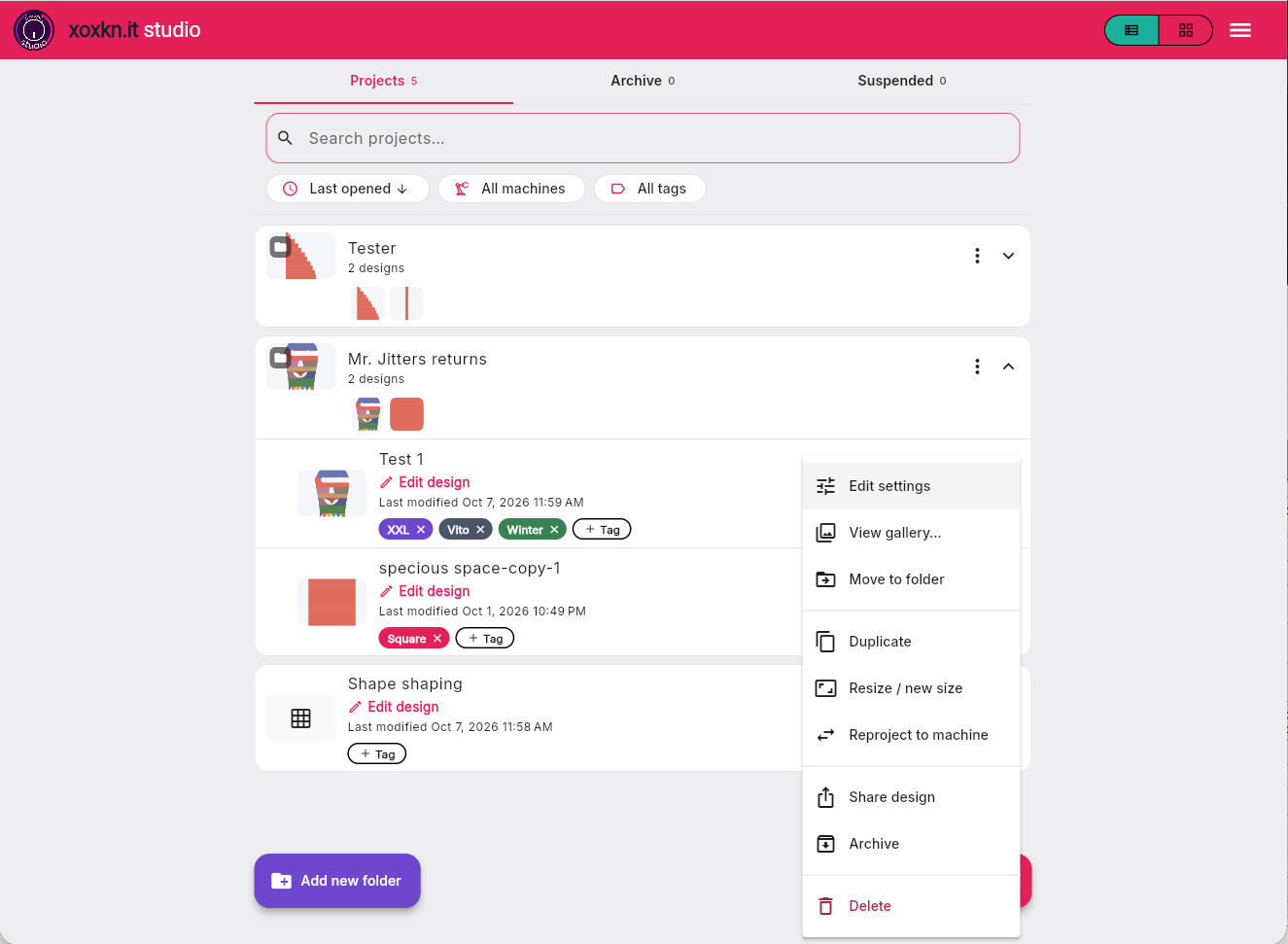
ATop bar
- 1List or gridToggle between list and grid views of your projects.
- 2MenuDark mode, app languages, and app settings.
BTabs, search and filters
- 3ProjectsYour active projects live here.
- 4ArchiveArchive old projects to keep your active projects window clearer.
- 5SuspendedIf your subscription lapses, your designs live here. Resubscribe during the year to regain access.
- 6SearchSearch for designs and folders by name.
- 7SortSort order.
- 8MachinesFilter your designs by machine.
- 9TagsFilter your designs by tags you create, like "XXL", someone's name, a style.
CYour designs and folders
- 10A folderGroup designs together, like the front, back, and arms of a sweater, to make it easier to find everything you need. Drag a design on top of the folder to add it. Drag it out to remove it. Use the three dot menu to edit folder info, set a cover image, or share all the designs.
- 11What is insideSee designs inside your folder.
- 12Open the folderShows the designs inside so you can work on them.
- 13An open folderIts designs are listed underneath.
- 14A designIts name, its shape, and when you last changed it.
- 15Edit designOpens the design in the Studio. A design you are knitting offers Continue knitting instead.
- 16TagsAdd a tag to a design or create a new one. Tap × to remove a tag.
DA design's ⋮ menu
- 17View gallerySee the pictures you stored with the design.
- 18Move to folderAdd or remove the design from a folder.
- 19DuplicateMake a copy of the design.
- 20Resize / new sizeRescale your design and save in a new file, changing length, width, or both.
- 21Reproject to machineMap your design to a new machine and save in a new file.
- 22Share designSend a link anyone can open.
- 23ArchiveMove the design into the archive folder. In the archive folder, you can move a file back.
- 24DeleteRemove the design for good. This cannot be undone.
EStart something new
- 25Add new folderMake a folder for a garment or a collection.
A folder's ⋮ menu
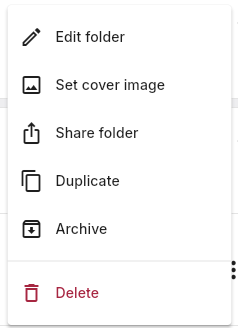
AA folder's ⋮ menu
- 26Edit folderChange the folder's name and notes.
- 27Set cover imagePick one of the folder's pictures as its cover. Add a photo to a design's gallery first.
- 28Share folderSend one link to every design in the folder.
- 29DuplicateCopy the folder and the designs in it.
- 30ArchivePut the folder away. Find it again in the Archive tab.
- 31DeleteDelete the folder and everything in it. This cannot be undone.
Creating and editing
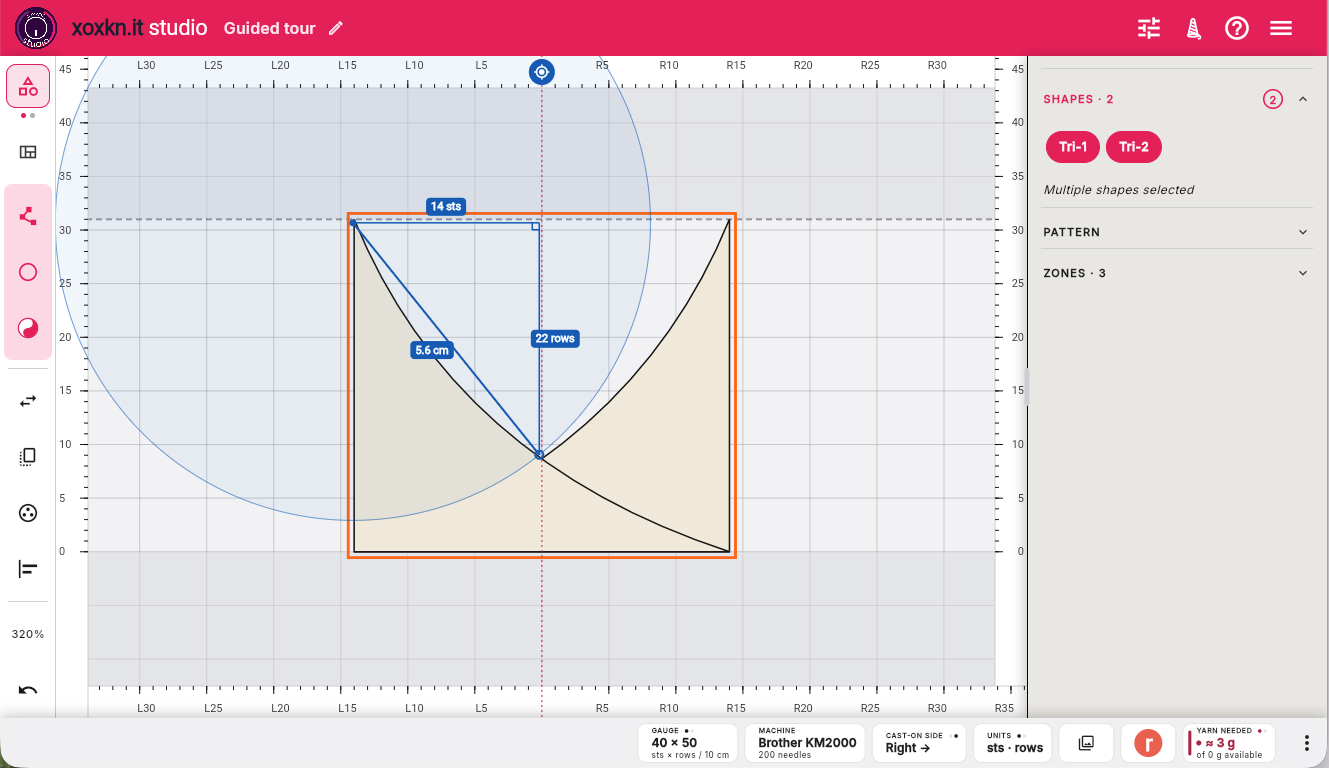
ATop bar
- 1Your designsTouch the logo to return to Projects menu
- 2Design nameTouch the pencil to change the project name.
- 3Knit itKnit your design: create a sharable link to your design, get onscreen or printed instructions, output to a file, or connect to an electronic machine.
- 4HelpQuick list of functions and keyboard shortcuts.
- 5Other stuffApp settings
BTool rail
- 6Design / Pattern switchSwap modes between Design (create with positive and negative) shapes and Pattern (adjust your pattern for knitability).
- 7Zone fill overlayShow knitting zones to see the sequence in which you will knit your design.
- 8Create shapeCreate a custom shape by adding points, or tap to see a menu of standard shapes you can start with. The yin-yang button lets you create negative shapes that cut holes in a shape.
- 9Edit pointsEdit points inside a shape - move, add, delete corners and curves.
- 10FlipFlip your selection. Tap to choose horizontal or vertical.
- 11MirrorMirror your selection. Tap for the mirroring options.
- 12DuplicateDuplicate your current selection.
- 13Group / ungroupGroup or ungroup your selection.
- 14Align / distributeOrient one or more objects relative to each other.
- 15ZoomZoom in or out using preset or custom values.
- 16Undo / redoUndo and redo.
- 17Import an imageTap to import an image (png, jpg) you can trace. Once it's in, tap again to show, hide, replace or remove it.
CRulers and canvas
- 18Needle rulerNeedle / cm ruler based on your gauge settings - touch to swap. Change to inches in Settings.
- 19Row rulerRow / cm ruler based on your gauge settings - touch to swap. Change to inches in Settings.
- 20Tailor's measureTouch to measure anything. Long press changes to a curved measure. Click outside or ESC to dismiss.
- 21Machine limitsBed limits for machine knitting. No limits for hand knitters.
- 22Your pieceYour design or pattern.
- 23Row zeroYour cast-on row. The lowest shape on the screen is always here.
- 24Knitting gridKnitting grid, always 1 stitch x 1 row. Measurement in cm or inches depends on your swatch.
DProperties panel
- 25ShapesSee the shapes in your design. You can change position and size, as well as corners and edges, here or on the canvas.
- 26PatternSee your pattern and its stitches.
- 27ZonesVisualize the knitting sequence. Select any zone for readouts on what's knit there.
EWidget bar
- 28GaugeSee your project's current gauge settings. Longpress to change gauge and see the effects instantly on the canvas.
- 29MachineYour currently selected machine. Longpress to change machine or add a new one.
- 30Cast-on sideYour currently selected cast-on side. Longpress to change. See your zone sequence change instantly.
- 31UnitsYour currently selected measurement system. Longpress to change.
- 32GalleryPictures saved with this design. Longpress to add from your library or take a screenshot of the canvas in the app.
- 33Post to RavelrySave your design to your Ravelry notebook with key data you can edit in Ravelry.
- 34Yarn neededYour estimated yarn needs calculated from your swatch's weight. Longpress to edit the weight, the yarn info, or update the wastage factor.
- 35More widgetsLongpress to modify the widget bar: hide or add widgets and change widget sequence.
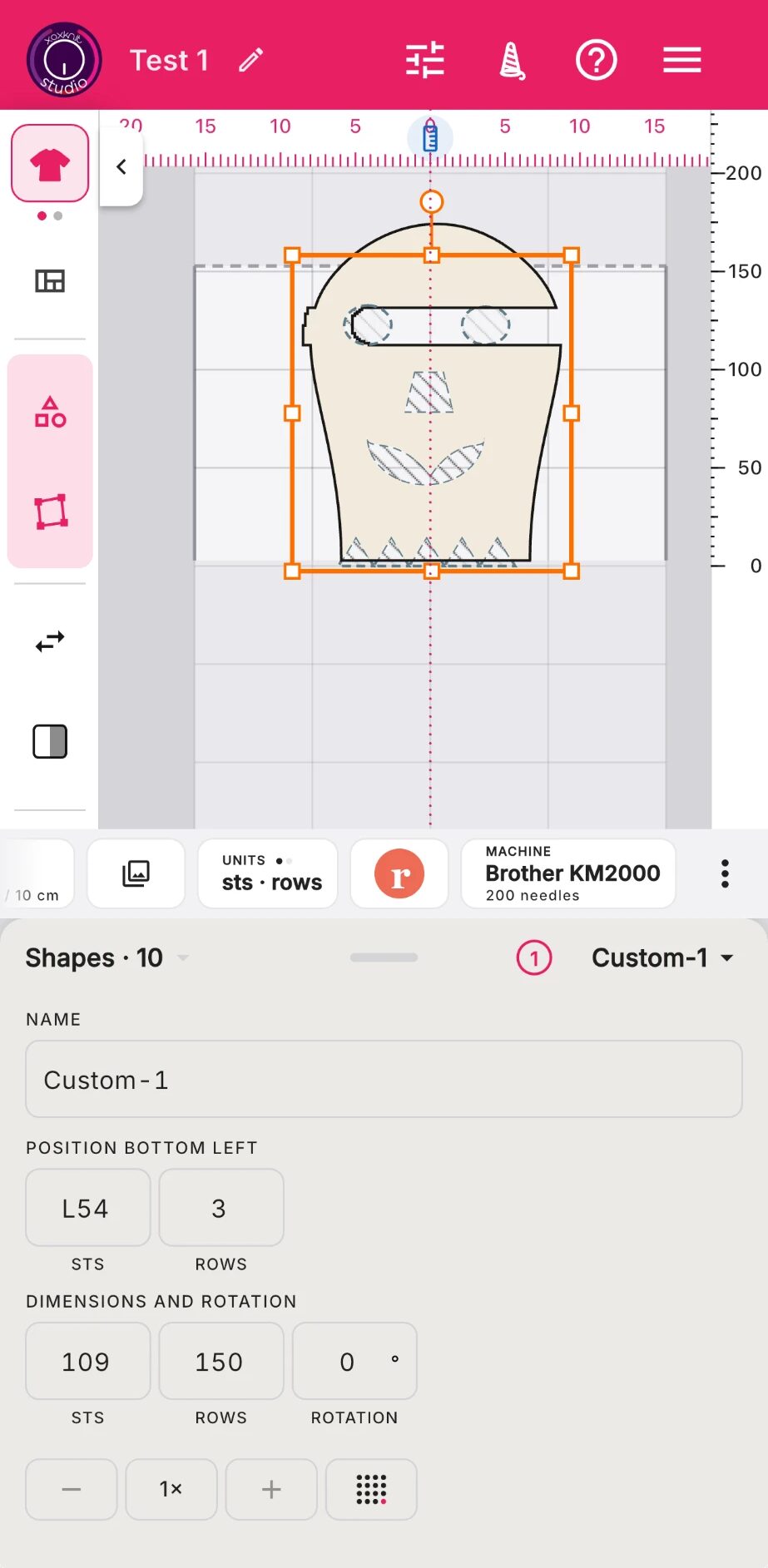
ATop bar
- 1Your designsTouch the logo to return to Projects menu
- 2Design nameTouch the pencil to change the project name.
- 3Project settingsChange gauge, machine, or yarn settings.
- 4Knit itKnit your design: create a sharable link to your design, get onscreen or printed instructions, output to a file, or connect to an electronic machine.
- 5HelpQuick list of functions and keyboard shortcuts.
- 6Other stuffApp settings
BTool rail
- 7Design / Pattern switchSwap modes between Design (create with positive and negative) shapes and Pattern (adjust your pattern for knitability).
- 8Zone fill overlayShow knitting zones to see the sequence in which you will knit your design.
- 9Create shapeCreate a custom shape by adding points, or tap to see a menu of standard shapes you can start with. The yin-yang button lets you create negative shapes that cut holes in a shape.
- 10Edit pointsEdit points inside a shape - move, add, delete corners and curves.
- 11FlipFlip your selection. Tap to choose horizontal or vertical.
- 12MirrorMirror your selection. Tap for the mirroring options.
- 13More toolsScroll or tap the three dots to see more: duplicate, group, align, zoom, undo and import a jpg or png to trace.
CRulers and canvas
- 14Needle rulerNeedle / cm ruler based on your gauge settings - touch to swap. Change to inches in Settings.
- 15Tailor's measureTouch to measure anything. Long press changes to a curved measure. Click outside or ESC to dismiss.
- 16Hide the railTouch to hide the tool rail.
- 17Row rulerRow / cm ruler based on your gauge settings - touch to swap. Change to inches in Settings.
- 18Machine limitsBed limits for machine knitting. No limits for hand knitters.
- 19Your pieceYour design or pattern.
- 20Row zeroYour cast-on row. The lowest shape on the screen is always here.
- 21Knitting gridKnitting grid, always 1 stitch x 1 row. Measurement in cm or inches depends on your swatch.
DWidget bar
- 22GaugeSee your project's current gauge settings. Longpress to change gauge and see the effects instantly on the canvas.
- 23GalleryPictures saved with this design. Longpress to add from your library or take a screenshot of the canvas in the app.
- 24UnitsYour currently selected measurement system. Longpress to change.
- 25Post to RavelrySave your design to your Ravelry notebook with key data you can edit in Ravelry.
- 26MachineYour currently selected machine. Longpress to change machine or add a new one.
- 27More widgetsLongpress to modify the widget bar: hide or add widgets and change widget sequence.
EProperties panel
- 28Shapes, Pattern or ZonesOpen Shapes (selected) and Pattern and Zones sections to view and edit every component of your design.
- 29Property panelDrag up to see and select sections, down for more canvas.
- 30Select severalShows how many shapes are currently selected.
- 31Selected shapePick a shape by name, or tap it on the canvas.
- 32ShapesSee the shapes in your design. You can change position and size, as well as corners and edges, here or on the canvas.
- 33Step and keypadTweak values up or down, or enter a value with the numeric keypad.
See it in motion, topic by topic
- Zone fill overlay Show knitting zones to see the sequence in which you will knit your design.
- Tailor's measure Touch to measure anything. Long press changes to a curved measure. Click outside or ESC to dismiss.
- Your piece Your design or pattern.
- Gallery Pictures saved with this design. Longpress to add from your library or take a screenshot of the canvas in the app.
- Post to Ravelry Save your design to your Ravelry notebook with key data you can edit in Ravelry.
- Yarn needed Your estimated yarn needs calculated from your swatch's weight. Longpress to edit the weight, the yarn info, or update the wastage factor.
Working with your designs
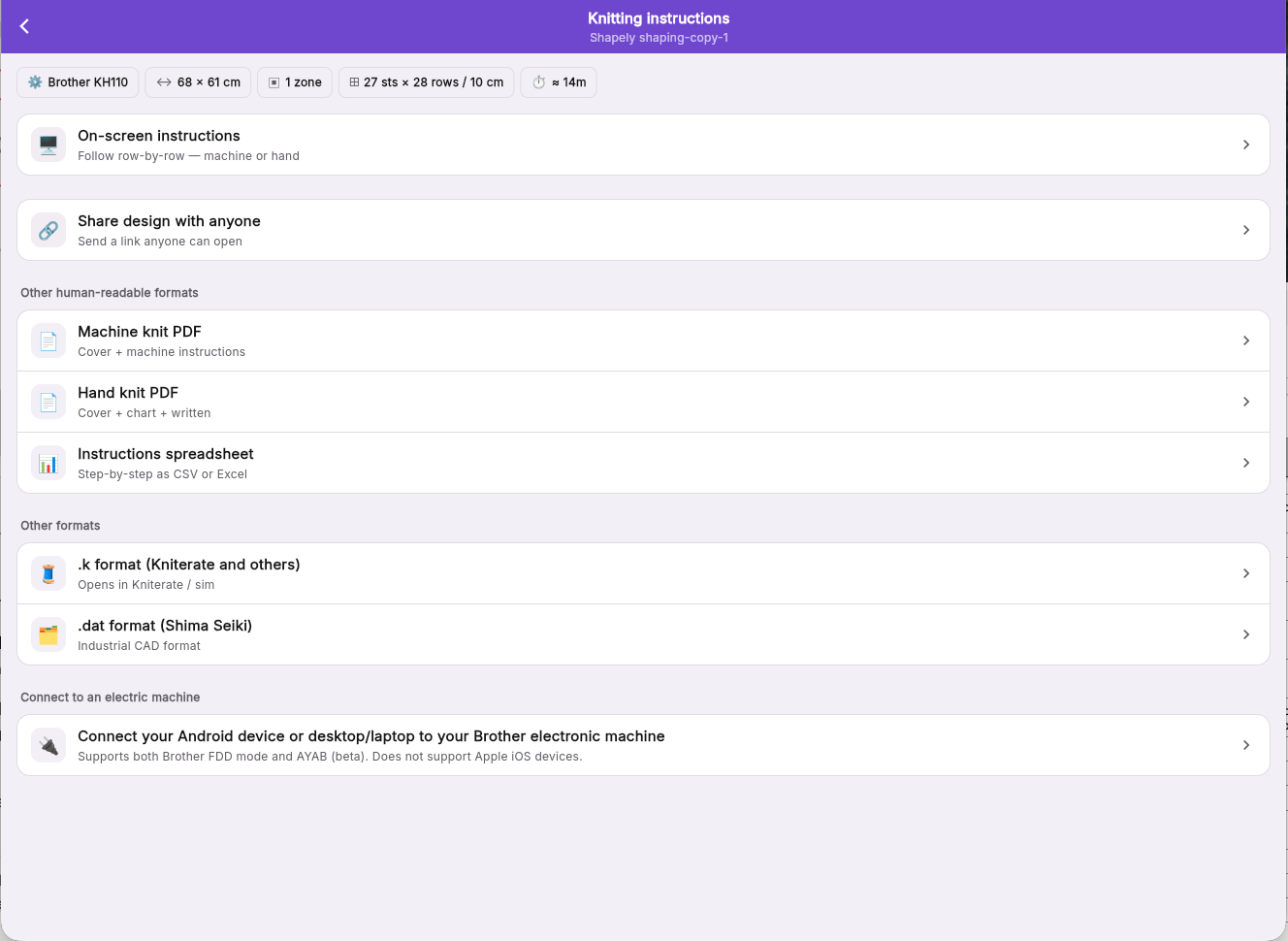
ATop bar
- 1BackBack to Studio.
- 2Knitting instructionsThe project you are working on.
BThe design at a glance
- 3At a glanceKey information about this project.
CKnit it now, or share it
- 4On-screen instructionsFollow row by row on your phone, tablet or computer, in machine or hand knitting terms.
- 5Share design with anyoneShare a link with anyone by email, SMS, WhatsApp or a copied link.
DPatterns and files
- 6Machine knit PDFA printable pattern for machine knitting: a cover page and the instructions.
- 7Hand knit PDFA printable pattern for hand knitting: a cover, a chart and written instructions.
- 8Instructions spreadsheetGet instructions in CSV or Excel format.
- 9.k formatPro: output file in .k format, a standard for machine knitting developed at Carnegie Mellon and used by Kniterate.
- 10.dat formatPro: a file for Shima Seiki industrial machines.
EYour knitting machine
- 11Connect your machineDrive a Brother electronic machine from an Android device or a computer running Chrome or Edge, in Brother FDD mode or with AYAB (beta). Not available on iPhone or iPad.
Onscreen instructions
Before you start
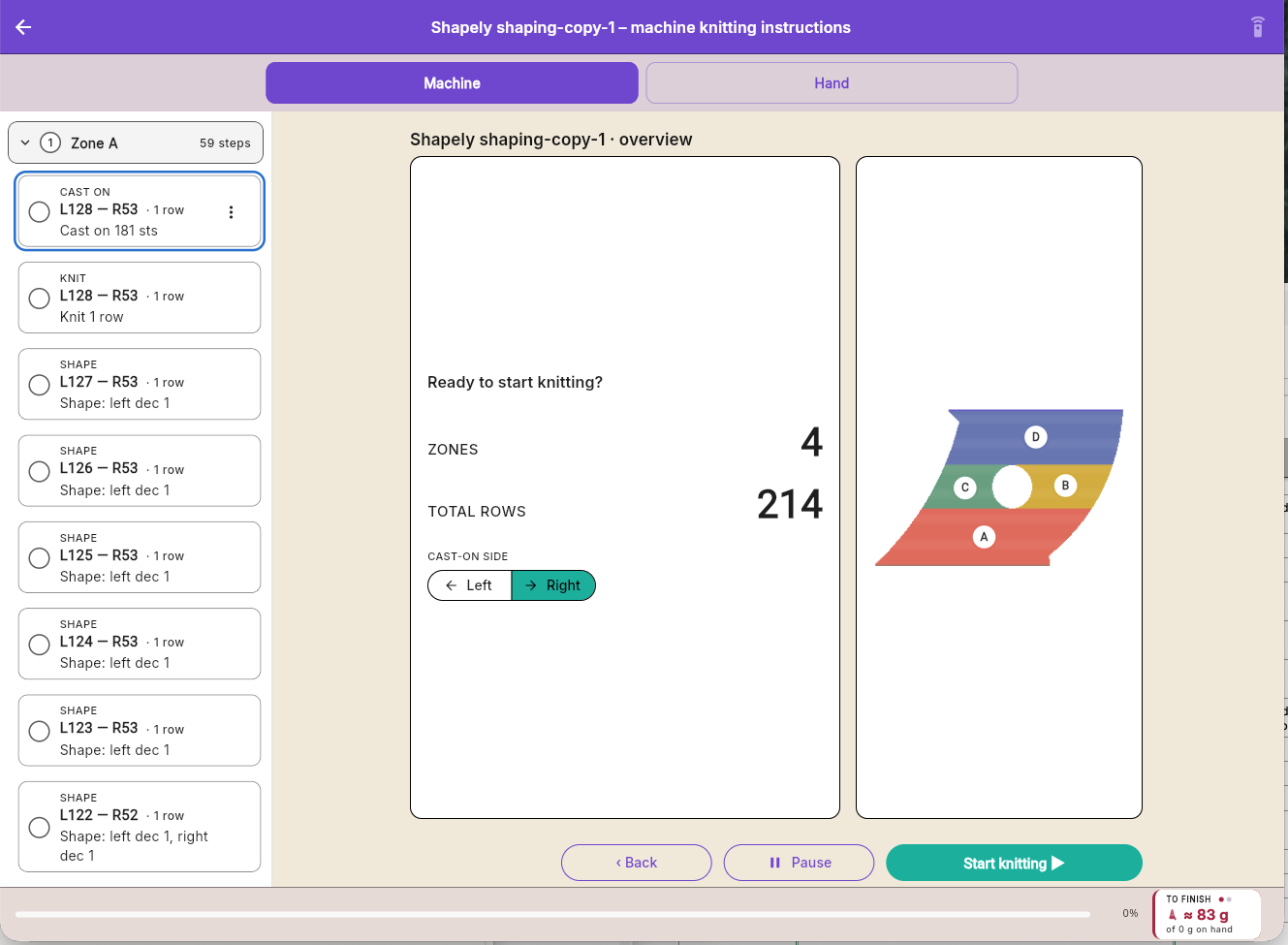
ATop bar
- 1BackBack to the main knitting page.
- 2TitleDesign name and hand/machine instructions.
- 3Foot pedalGo hands-free with a Bluetooth pedal - longpress to set one up, tap to toggle on and off.
BMachine or hand
- 4MachineGet knitting instructions with machine knitting terms.
- 5HandGet knitting instructions with hand knitting terms and symbols.
CZones and steps
- 6A zoneEach zone and its steps, in knitting order. Tap to open or close it.
- 7A stepWhat to do and on which needles. The circle shows whether it is done.
DThe overview
- 8Ready to start knitting?Before you start: how many zones and rows the piece has.
- 9Cast-on sideWhich side your carriage starts from. Change it here before you start.
- 10Your pieceThe piece with its zones lettered in knitting order.
EStart, and your progress
- 11BackGo back a step.
- 12PauseStop for now. Studio remembers where you were.
- 13Start knittingBegin with the first step.
- 14ProgressHow far through the piece you are.
- 15To finishThe yarn still needed to finish, against what you have on hand.
Knitting a step
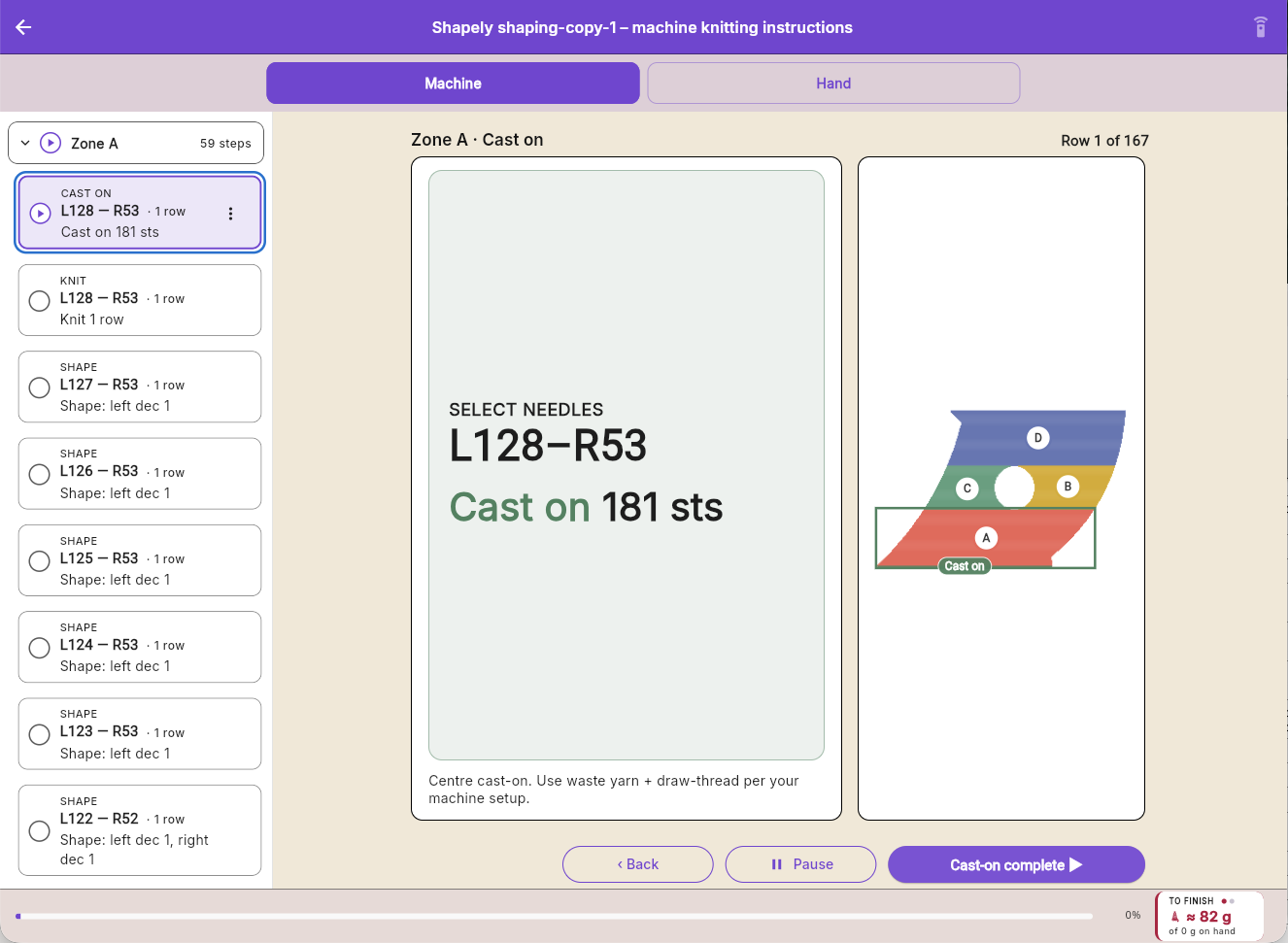
AThis step
- 16RowThe row you are on.
- 17What to doThe step in large type you can read from the machine: the needles to use and the action.
- 18TipHow to do this step.
- 19Where you areWhere this step sits on your piece.
BMoving on
- 20Cast-on completeTap when the step is done to move to the next one.
Settings
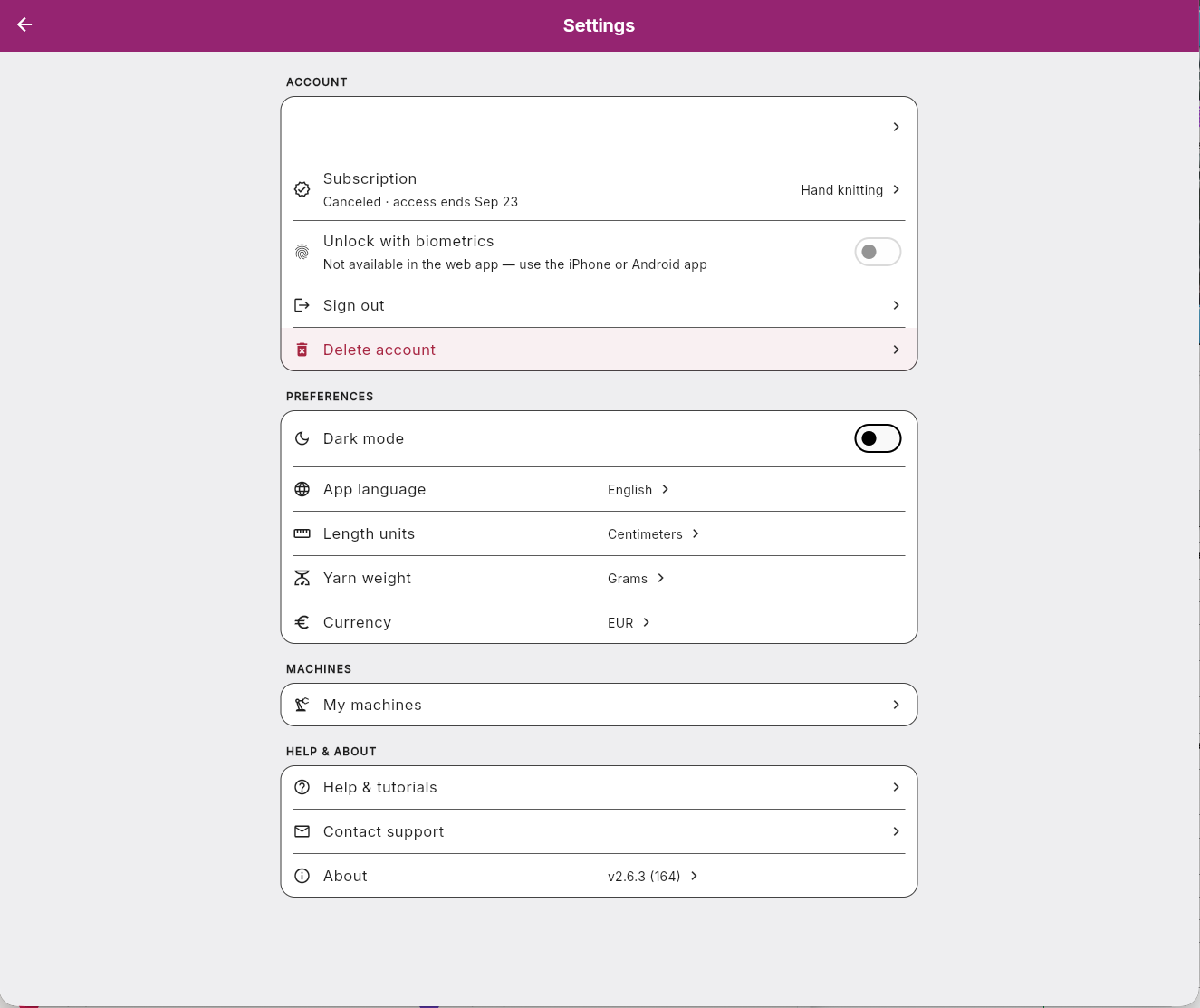
ATop bar
- 1BackBack to where you were.
BAccount
- 2Your profileYour name and email address. Tap to see your profile.
- 3SubscriptionYour plan and its status. Tap to change or cancel it.
- 4Unlock with biometricsOpen the app with your face or fingerprint. In the iPhone and Android apps only.
- 5Sign outSign out on this device.
- 6Delete accountDelete your account and all your designs. This cannot be undone.
CPreferences
- 7Dark modeSwitch between light and dark.
- 8App languageChoose the language the app speaks.
- 9Length unitsCentimetres or inches, for rulers and measurements.
- 10Yarn weightThe unit Studio uses for yarn weight.
- 11CurrencyYour preferred currency: euros or dollars.
DMachines
- 12My machinesThe machines you knit on. Add a machine, or change or remove one.
EHelp and about
- 13Help & tutorialsShort guides to how Studio works.
- 14Contact supportWrite to us. A person answers.
- 15AboutThe app version, release notes, and the legal pages.